
A browser game from DillaDev Studios
OceanFall
Bring every booster home.
A falling rocket. A moving drone ship. One clean landing. Manage thrust, fuel, and drift to recover a reusable booster at sea, from calm first flights to night approaches and squalls.

- 3D browser flight
- No account required
- Keyboard, touch, and gamepad
- Offline practice
OceanFall at a glance
- Career missions
- 12
- Chapters
- 3
- Flight modes
- 3
- Boosters
- 3
- Flight School lessons
- 4
- Camera views
- 4
The recovery
The last few metres make the mission.
Each attempt starts with the booster already falling. A typical flight takes 30 to 60 seconds. OceanFall uses fictional hardware in a game simulation.
- 01
Brake the fall
Raise the throttle to slow your descent. Too little thrust hits hard; too much sends you climbing and wastes fuel.
- 02
Cancel the drift
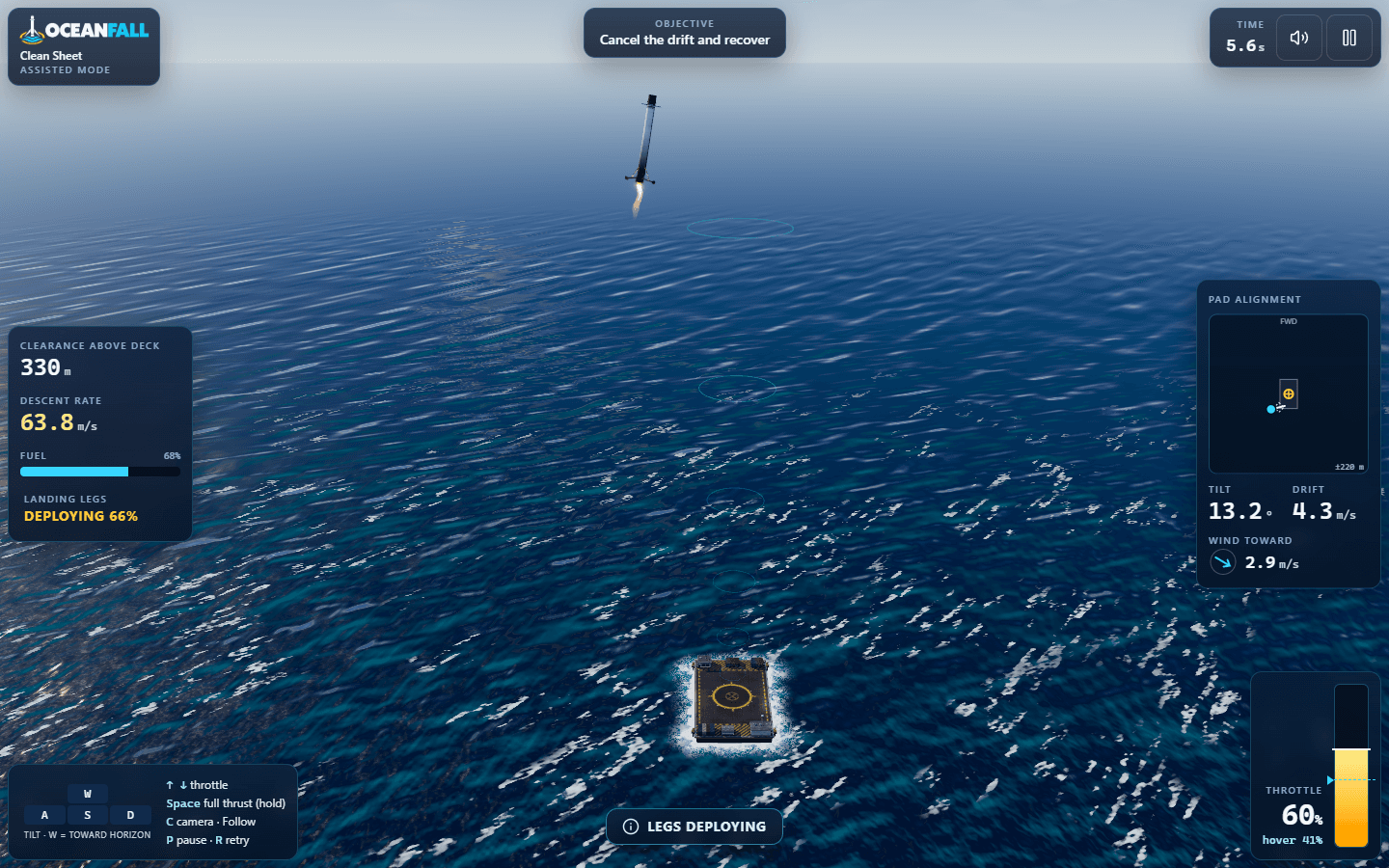
Tilt toward the pad to move across the water, then tilt back to stop. Read the alignment panel in ship coordinates.
- 03
Lock the legs
Deploy before touchdown: the legs need 2.5 seconds to swing down and lock.
- 04
Touch down gently
Arrive upright with low descent and sideways speeds. Keep all four feet inside the marked landing area.
- 05
Cut the engine
Shut down and stay supported, steady, and upright for two seconds. Thrust left on can lift you off the deck.
A deck that never sits still
The ship rises, pitches, and rolls with the swell. Some missions put it under way, and your touchdown speeds are measured relative to the moving deck.
Every burn changes the flight
Fuel is finite. The booster gets lighter and more responsive as it burns, while the engine takes time to spool and tilt commands have a short delay.
Instruments with a purpose
Track clearance, descent, fuel, tilt, drift, and wind. The pad alignment panel shows where you are, where you are drifting, and your projected touchdown.
Records earned in the simulation
When connected, the server re-flies your recorded inputs and decides the result. Leaderboards use verified scores, with separate boards for each mission, flight mode, and booster configuration.
Ways to fly
Learn the burn. Take on the sea.
Flight School
Four replayable lessons teach thrust, cancelling drift, landing legs, and a full recovery. Follow prompts, highlighted controls, guidance rings, and a reference-autopilot ghost.
Recovery Career
Bring boosters home across twelve missions in three chapters. A successful recovery in any flight mode unlocks the next mission; most missions have a 90-second limit.
Trials
Fuel Trial rewards fuel remaining. Precision Trial uses a gently moving deck and landing limits 20% tighter, with scoring weighted toward pad-centre accuracy. Both require a safe landing.
Daily Recovery
One shared challenge per UTC day. Everyone flies the same conditions in Standard mode with a stock Kestrel. Start an official daily run while connected; the cached challenge can be practised offline.
Free Flight
Choose wind, swell, time of day, starting height and offset, fuel, rain, fog, and ship speed. Each setup keeps its own local record. Practice is never ranked and earns no credits.
Quick Recovery takes you straight into the first career mission.
Recovery Career
From first touchdown to the weather window.
CHAPTER 01
First Recovery
Calm weather and generous fuel introduce offsets, a moving ship, and a diagonal approach.
Shakedown · Sidestep · Following Sea · Clean Sheet
CHAPTER 02
Open Water
Wind, longer approaches, a faster ship, and reduced fuel make every correction count.
Crosswind · Long Reach · Moving Target · Thin Margins
CHAPTER 03
Weather Window
Swell, darkness, rain, fog, and stronger gusts test your recovery skills. One Light allows a single engine ignition.
Dusk Swell · Night Shift · Squall Line · One Light
Choose your flight mode
More guidance, or a tighter landing.
| Setting | Assisted | Standard | Expert |
|---|---|---|---|
| Self-levelling | Strong | Gentle | None |
| Guidance rings | Yes | Lessons only | No |
| Landing legs | Automatic at 150 m | Manual | Manual |
| Wind effect | 80% | 100% | 130% |
| Engine ignitions | Unlimited | Unlimited | 3 |
| Downward speed limit | 3.0 m/s | 2.5 m/s | 2.0 m/s |
| Sideways speed limit | 1.8 m/s | 1.5 m/s | 1.2 m/s |
| Tilt limit | 8° | 7° | 5° |
Assisted never works the throttle for you. Expert holds the attitude you leave it in. Scores, medals, and leaderboards stay separate for each flight mode; mission-specific limits can add another challenge.
Recovery Workshop
Choose your booster. Balance every upgrade.
Kestrel
A forgiving, balanced starter with generous reserves. Available from the start.
Marlin
Light and quick with a smaller fuel reserve. Unlock by recovering every First Recovery mission.
Atlas
Heavy and powerful, with slower turning. Unlock by recovering every Open Water mission.
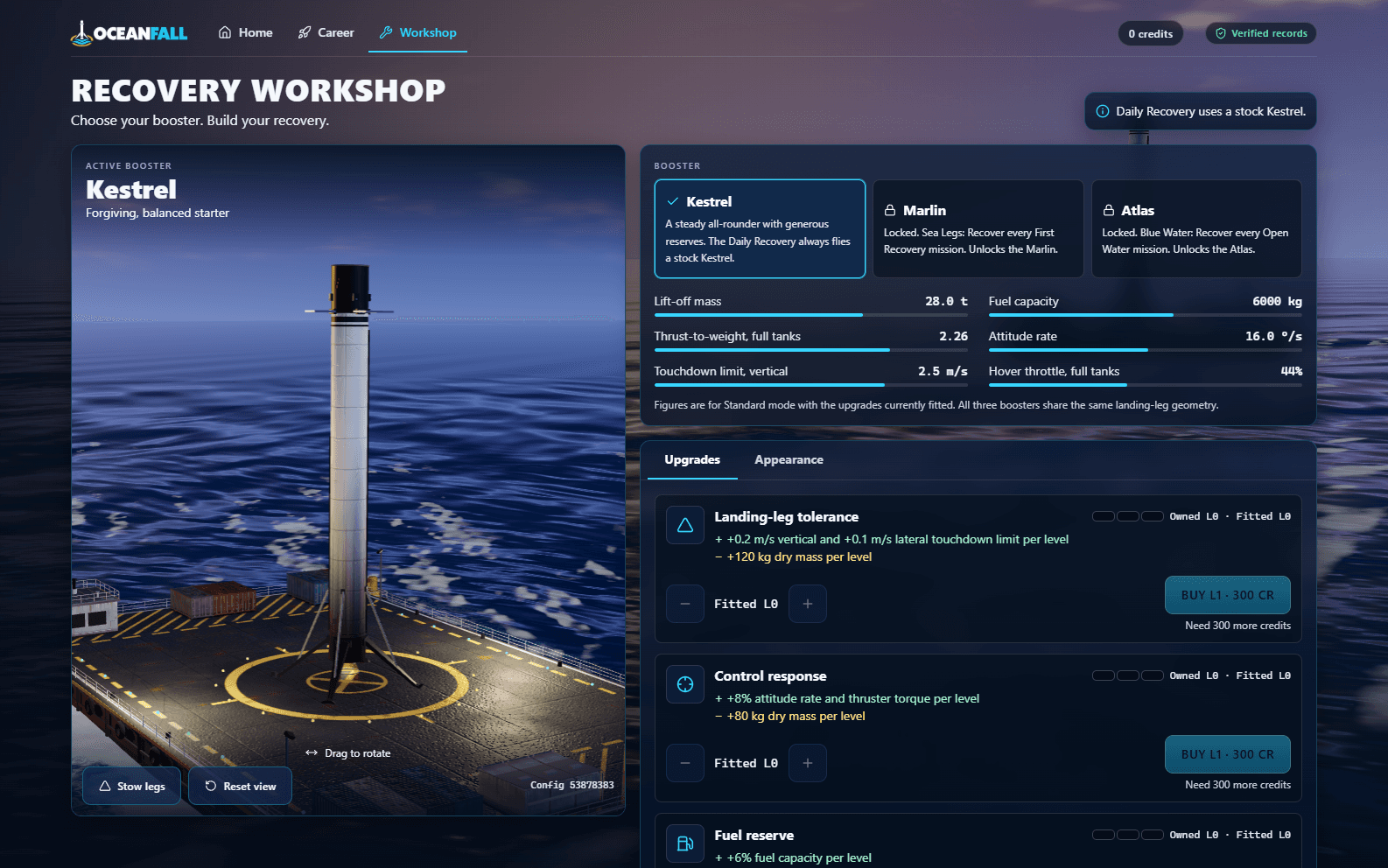
Three upgrade tracks, three levels each
- Landing-leg tolerance
- More room for downward and sideways touchdown speed, with added dry mass.
- Control response
- Quicker attitude changes and stronger control thrusters, with added dry mass.
- Fuel reserve
- More fuel capacity, with a heavier booster and slower response early in the burn.
Buy upgrades with credits from server-verified recoveries. Owned levels stay yours; fit any level you own, including none. Every booster and fitted-upgrade combination has its own scores and leaderboard. Unlock liveries, mission patches, and engine glows through your recoveries; appearance never affects flight.
Debriefs, replays, and medals
Make the next approach better.
Know what happened
Each debrief names the outcome, diagnoses it, and gives a specific tip. Compare touchdown speed, drift, and tilt against their limits, then review accuracy, fuel, and flight time. Only a successful recovery scores. Chase bronze, silver, and gold, with separate Fuel and Precision Trial scoring.
Re-fly your inputs
Pause, scrub, watch at half speed, or switch among Follow, Chase, Wide, and Deckside cameras. Jump to the final seconds and fly alongside a ghost of your best matching mission, flight mode, and booster configuration. Older-version replays are marked outdated.
Screenshots
See the approach from every angle.
Open a screenshot for the full view. Browse with the arrow keys and press Escape to close.
Flight controls
Keep your hands on the recovery.
| Action | Keyboard | Gamepad | Touch |
|---|---|---|---|
| Pitch forward / back | W / S | Left stick | Left stick |
| Roll left / right | A / D | Left stick | Left stick |
| Yaw | Q / E | Bumpers | Optional buttons |
| Throttle up / down | Up / Down | Right / left trigger | Slider on the right |
| Full thrust while held | Space | A | FULL |
| Deploy legs | G | X | LEGS |
| Switch camera | C | Y | Camera button |
| Pause | P or Esc | Start | Pause button |
| Retry | R | Not specified | Pause menu |
Tilt always uses ship coordinates, whichever camera you choose. Keyboard keys can be remapped; Esc always pauses.
Space gives full thrust while held, then restores your previous throttle setting. The touch slider keeps its setting when released. The tilt stick and throttle work together.
Switching tabs pauses the flight. Held inputs release when focus is lost, the device rotates, the game pauses, or a gamepad disconnects.
Before your first flight
Recovery questions, answered.
Do I need an account or an installation?
No account is needed: you play as a guest in a browser.
Can I play on a phone or with a gamepad?
Yes. Touch uses a tilt stick and a throttle slider that work together, with compact instruments. Keyboard and gamepad controls are also supported.
What can I do offline?
You can fly and keep local, unverified records. Successful career and trial recoveries are saved for verification when the server is reachable again. Credits, upgrades, and leaderboards need the server, so upgrades cannot be bought or refitted offline. A cached Daily Recovery can be practised offline; official daily runs must start while connected.
Does Assisted mode land the booster for me?
No. Assisted mode steadies the booster, adds guidance rings, and deploys the legs automatically at 150 m. You still control the throttle and fly the landing.
How are leaderboard results verified?
The server re-flies your recorded inputs and calculates the result itself. It does not accept a score or a landed claim from the browser. Boards are separate for each mission, flight mode, and booster configuration.
Can I pause or review an attempt?
Pause freezes the flight, clock, ship, and wind. Switching tabs pauses too. Replays can pause, scrub, run at half speed, and switch cameras; Final seconds jumps to about 13 seconds before the end.
What comfort options are available?
Settings include reduced motion, camera shake, guidance brightness, the hover marker, ghost visibility, keyboard remapping, graphics presets, and separate audio volumes. Career and Workshop can use a still ocean background. Settings are saved on the device.
The deck is waiting.
Slow the fall, cancel the drift, and bring the booster home.