

DillaDev Notes
May 8, 2026
Building a Blue/Green Deployment Pipeline
Deploy updates with less downtime, safer rollbacks, and more confidence.
Docker + CI/CD + Operations
A practical release pattern before Kubernetes enters the room.
Blue/green deployment gives small teams a repeatable way to stage, validate, switch, and roll back web app releases using tools they may already have: Docker, a registry, a reverse proxy, and a CI/CD pipeline.
Intro
Many small businesses still deploy by replacing the live app directly.
That works until it does not. A direct live replacement means the deployment, validation, and customer experience all happen in the same fragile moment.
For small business web apps, SaaS products, internal portals, and customer-facing dashboards, a broken deployment is not just a technical inconvenience. It can mean lost leads, failed checkouts, support tickets, unhappy users, and a team trying to debug production while customers are watching.
Blue/green deployment is a safer alternative. Instead of replacing the live app in place, you deploy the new release beside it, test it, and move traffic only when the new stack is ready.

Server Rack With Blue/Green Release Paths
The goal is simple: keep production steady while the next version comes online beside it.
For small teams, blue/green deployment turns a risky server replacement into a controlled routing decision.
Release Pattern
What is blue/green deployment?
Blue is current production
Blue is the version receiving customer traffic right now.
Green is the next release
Green is deployed separately so it can be tested before customers see it.
Validate before switching
Health checks and smoke tests run against green while blue keeps serving production.
Move traffic when ready
The reverse proxy switches the public route to green only after validation passes.
Rollback stays simple
If the new release fails, switch the proxy back to blue while the team investigates.

Cloud Deployment Automation
Blue and green are operational targets, not just branch names.
The pattern works because automation can deploy, inspect, and switch between two reachable environments.
Business Impact
Why blue/green deployments matter
Reduced downtime
The new stack starts before traffic moves, so releases do not require taking the current app offline.
Safer releases
The inactive environment can be checked, warmed up, and tested before it becomes public.
Faster rollback
The previous version remains available, making rollback a routing decision instead of a rebuild.
Easier testing
Smoke tests can target the new stack directly without interrupting active users.
Less deployment stress
Teams can ship with a clearer checklist and fewer manual production guesses.
Better customer experience
Users see fewer maintenance windows, fewer half-deployed states, and fewer visible failures.
Software Deployment Pipeline Dashboard
Make deployment status visible before traffic moves.
Dashboards, logs, and release metadata help teams know which stack is live, which one is staged, and whether the new release is healthy.
Architecture
Example architecture for a small-business web app
You do not need Kubernetes to get value from blue/green deployment. A practical first version can run on a VPS, mini server, Docker host, Portainer environment, or cloud VM.
Dockerized frontend and backend
Package the web app, API, workers, and dependencies into versioned images.
Two app stacks
Run app-blue and app-green so one stack can serve traffic while the other receives the new release.
Shared database
Most small-business setups keep one database, which means migration strategy matters.
Reverse proxy
Nginx Proxy Manager, Nginx, Traefik, Caddy, or another proxy controls the public route.
Health check endpoint
Expose /health or /api/health so automation can confirm the stack is alive.
Container registry
Push images to Azure Container Registry, Docker Hub, GitHub Container Registry, or a private registry.
CI/CD pipeline
GitHub Actions or Azure DevOps builds, pushes, deploys, validates, and switches traffic.
Optional smoke tests
Playwright can check login, search, checkout, contact forms, and key API responses.
Docker
Blue/green with Docker
Build once. Promote the same image.
The pipeline should build a single image for a release, tag it clearly, and deploy that exact artifact to the inactive environment. Rebuilding different images for test and production creates drift.

Docker Containers Concept
Container images should behave like labeled, movable release units.
Tag each release clearly, deploy the same artifact everywhere, and avoid production drift caused by rebuilding at the last minute.
Example Stack Names
Traffic Switch
Reverse proxy switching
The reverse proxy is what makes the cutover fast. The public domain points to whichever stack is currently active, while both stacks remain available on the private Docker network or internal hostnames.
Public domain forwards to the active stack.
The inactive stack runs on an internal service name, port, or upstream.
After tests pass, the proxy target changes from blue to green or green to blue.
The previous stack keeps running for fast rollback.
Nginx Proxy Manager is a friendly option.
For self-hosted environments, Nginx Proxy Manager is approachable because it gives teams a UI for proxy hosts, TLS certificates, and upstream routing. More advanced teams may automate Nginx, Traefik, or Caddy directly.
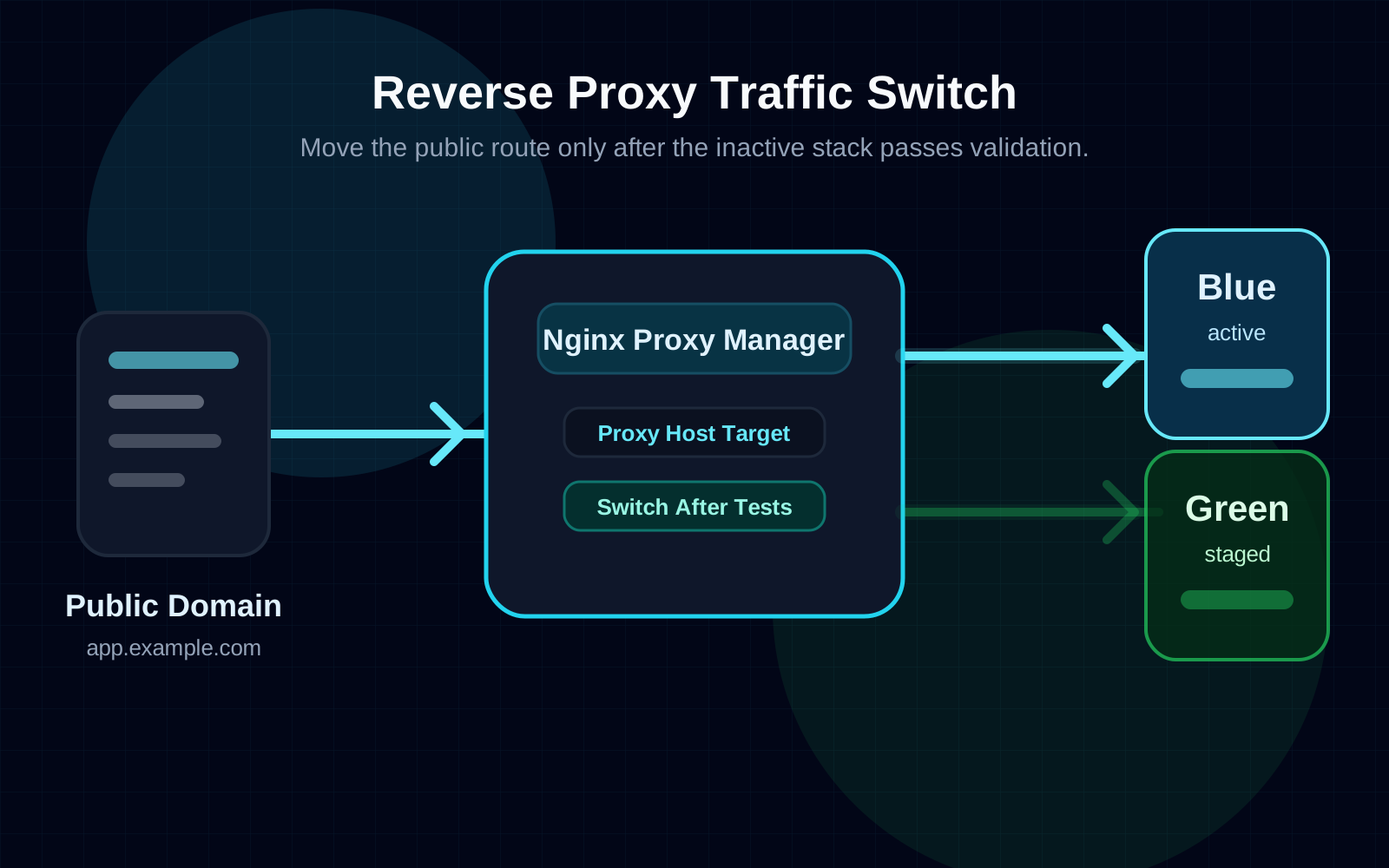
Nginx Reverse Proxy Diagram
The proxy is the handoff point between old and new releases.
Once the inactive stack passes validation, the proxy target changes while the previous stack remains available for rollback.
Important Warning
Blue/green is simple for stateless apps. Databases make it harder.
If blue and green share the same database, the new release and previous release may need to work against the same schema at the same time.
Do not treat migrations as an afterthought.
A reversible proxy switch cannot save a release if the database schema has already been changed in a way the previous version cannot use.
Validation
Health checks
Health checks should answer a direct question: is this release safe enough to receive traffic? For a real app, that usually means checking more than whether the HTTP process is alive.
/health confirms the web service boots and can respond.
/api/health confirms the API process is running.
Database connectivity checks confirm the app can reach the shared database.
A version endpoint reports the running release, image tag, and commit.
Dependency status checks verify critical services like cache, queue, email, or storage.
{
  "status": "ok",
  "version": "1.4.2",
  "commit": "abc123",
  "database": "connected"
}
Automated Testing
Automated smoke testing
Health checks prove that the app is alive. Smoke tests prove that the most important user paths still work.

DevOps Engineer Working on CI/CD
Do not switch traffic until tests pass.
Playwright, Cypress, k6, Postman/Newman, or a simple script can all help validate the inactive stack before the public route moves.
CI/CD
Example pipeline flow
Developer pushes to main.
CI builds the Docker image.
Image is pushed to the registry.
Pipeline detects the inactive environment.
New image deploys to the inactive stack.
Health checks run against the inactive stack.
Smoke tests run against the inactive stack.
Reverse proxy switches public traffic.
Logs and metrics are watched after cutover.
Old stack stays running for quick rollback.
Pipeline Outline
Generic GitHub Actions or Azure DevOps-style outline
The exact commands depend on your host, registry, proxy, and deployment tooling. Keep secrets in the CI/CD secret store and pass only placeholders or environment variables through the pipeline.
name: blue-green-deploy

on:
  push:
    branches:
      - main

env:
  IMAGE_NAME: my-small-business-app
  REGISTRY: ghcr.io/YOUR_ORG
  COMMIT_SHA: ${{ github.sha }}

jobs:
  build-test-deploy:
    runs-on: ubuntu-latest

    steps:
      - name: Checkout
        uses: actions/checkout@v4

      - name: Run tests
        run: npm ci && npm test

      - name: Log in to container registry
        run: echo "${{ secrets.REGISTRY_PASSWORD }}" | docker login "${{ env.REGISTRY }}" --username "${{ secrets.REGISTRY_USERNAME }}" --password-stdin

      - name: Build image
        run: docker build -t "${{ env.REGISTRY }}/${{ env.IMAGE_NAME }}:${{ env.COMMIT_SHA }}" .

      - name: Push image
        run: docker push "${{ env.REGISTRY }}/${{ env.IMAGE_NAME }}:${{ env.COMMIT_SHA }}"

      - name: Deploy inactive stack
        uses: appleboy/ssh-action@v1.2.0
        with:
          host: ${{ secrets.DEPLOY_HOST }}
          username: ${{ secrets.DEPLOY_USER }}
          key: ${{ secrets.DEPLOY_SSH_KEY }}
          script: |
            export IMAGE_TAG="${{ env.COMMIT_SHA }}"
            ./deploy-inactive-stack.sh "${IMAGE_TAG}"
            ./wait-for-health.sh "http://app-inactive.internal:3000/health"

      - name: Run smoke tests
        run: |
          npm ci
          TARGET_URL="${{ secrets.INACTIVE_STACK_URL }}" npx playwright test tests/smoke

      - name: Switch proxy target
        uses: appleboy/ssh-action@v1.2.0
        with:
          host: ${{ secrets.DEPLOY_HOST }}
          username: ${{ secrets.DEPLOY_USER }}
          key: ${{ secrets.DEPLOY_SSH_KEY }}
          script: |
            ./switch-proxy-target.sh
            ./confirm-public-health.sh "https://www.example.com/health"
Cloud Deployment Automation
The pipeline should move releases through predictable gates.
Build, push, deploy, validate, switch, and monitor should be repeatable enough that a normal release does not feel like a production incident.
Rollback
Rollback strategy
The previous version is still there.
That is the main advantage. A rollback should be a fast, deliberate routing change, not a scramble to rebuild an old commit under pressure.
Operations
Monitoring and alerting
Blue/green deployment reduces release risk, but it does not replace monitoring. After traffic moves, your team still needs visibility into whether the new version is healthy under real usage.
Container health and restart counts
Application logs and structured error output
Uptime checks from outside the server
Error rates and failed requests
Response time and latency trends
Database connectivity and slow queries
Teams, email, SMS, or webhook notifications

Application Monitoring Dashboard
After cutover, monitoring tells you whether the release is healthy under real traffic.
Watch errors, response time, uptime checks, and logs immediately after the proxy switch so rollback remains a calm decision.
Avoid These
Common mistakes
Switching traffic before tests finish.
Running irreversible migrations during the same release.
Not versioning Docker images.
Using only the latest tag in production.
Shutting down the old environment too soon.
Never testing rollback.
Forgetting environment variables or secrets in one stack.
Business Fit
Is blue/green worth it for small businesses?
Yes, when downtime has a real cost.
Sometimes it is overkill.
Final Verdict
Blue/green deployment is one of the most practical reliability upgrades a small business can make before jumping straight to Kubernetes.
It gives teams safer releases, cleaner validation, and faster rollback using a deployment model that works with Docker, reverse proxies, CI/CD, health checks, and good operational discipline.
Find Out More
Related Reading
How to self-host your own monitoring platform
A practical next step for uptime checks, health endpoints, alerting, and production visibility.
Read moreDocker vs Kubernetes for small businesses
Use the cloud and DevOps service page as the current destination for Docker, CI/CD, and hosting decisions.
Read moreHow to automate deployments with Azure DevOps
DillaDev supports Azure-based deployments, build pipelines, image publishing, and rollout cleanup.
Read moreHow to monitor Docker containers properly
Connect container health, logs, uptime checks, and alert routing into a more useful monitoring workflow.
Read moreCustom software development
For teams that need the application code, deployment model, and operational workflow improved together.
Read moreDeployment Automation
Need a safer deployment pipeline?
DillaDev can help design and implement Docker-based deployment pipelines, blue/green releases, reverse proxy routing, automated testing, monitoring, and rollback workflows.